Image cards
Nine commands upload your league data as a PNG image instead of replying with a text embed.
Every command whose name starts with render- belongs to this family; all the others are documented
under Commands.
They come in three groups. Session cards show one race or qualifying session, season cards show a whole season at once, and history cards look across many seasons.
| Command | Card | Text-embed counterpart |
|---|---|---|
/render-race-results |
Race result table | /race-results |
/render-qual-results |
Qualifying result table | /qual-results |
/render-race-highlights |
Session highlights (stat tiles) | — |
/render-race-strategy |
Tyre strategy (stint chart) | — |
/render-standings |
Championship standings | /standings |
/render-lineup |
Season lineups — who drives for whom | — |
/render-calendar |
Season calendar | /season |
/render-track |
Track history | /track |
/render-team |
Team career | /team |
The session cards take the same season, round and session options as the embed commands and
follow the same defaults — see
How season, round and session are chosen.
The season cards have no session to pick, so they take season and nothing else beyond their own
options. The history cards belong to neither a session nor a season: /render-track takes a circuit
and /render-team a team plus the group of seasons to count it in.
Sample data
The cards on this page are rendered from sample data, so the drivers, teams and tracks are made up. The layout is exactly what your league gets.
Which form to use
Neither form is better; they are good at different things.
| Text embed | Image card | |
|---|---|---|
| Text can be selected, copied and searched in Discord | yes | no |
| Follows each reader's own Discord light/dark theme | yes | no — fixed by /setup theme |
| Reflows on narrow phone screens | yes | shown as a scaled-down preview, tap to enlarge |
| Team colours, tyre compounds, stint bars, podium boxes | no | yes |
| Shareable outside Discord as a single file | no | yes |
| Shows the whole field of a session, not just the top 10 | no | yes |
| Highlights, tyre strategy, lineups | not available | yes |
| The whole history — every race at a circuit, every season of a team | top of the list only | yes |
A common pattern is to post the embed right after a race for quick reading and discussion, and the image card in a dedicated results channel, where it gets pinned and shared.
Theme
The colour theme is a per-server setting, not a command option — see Image card theme.
Race result
/render-race-results
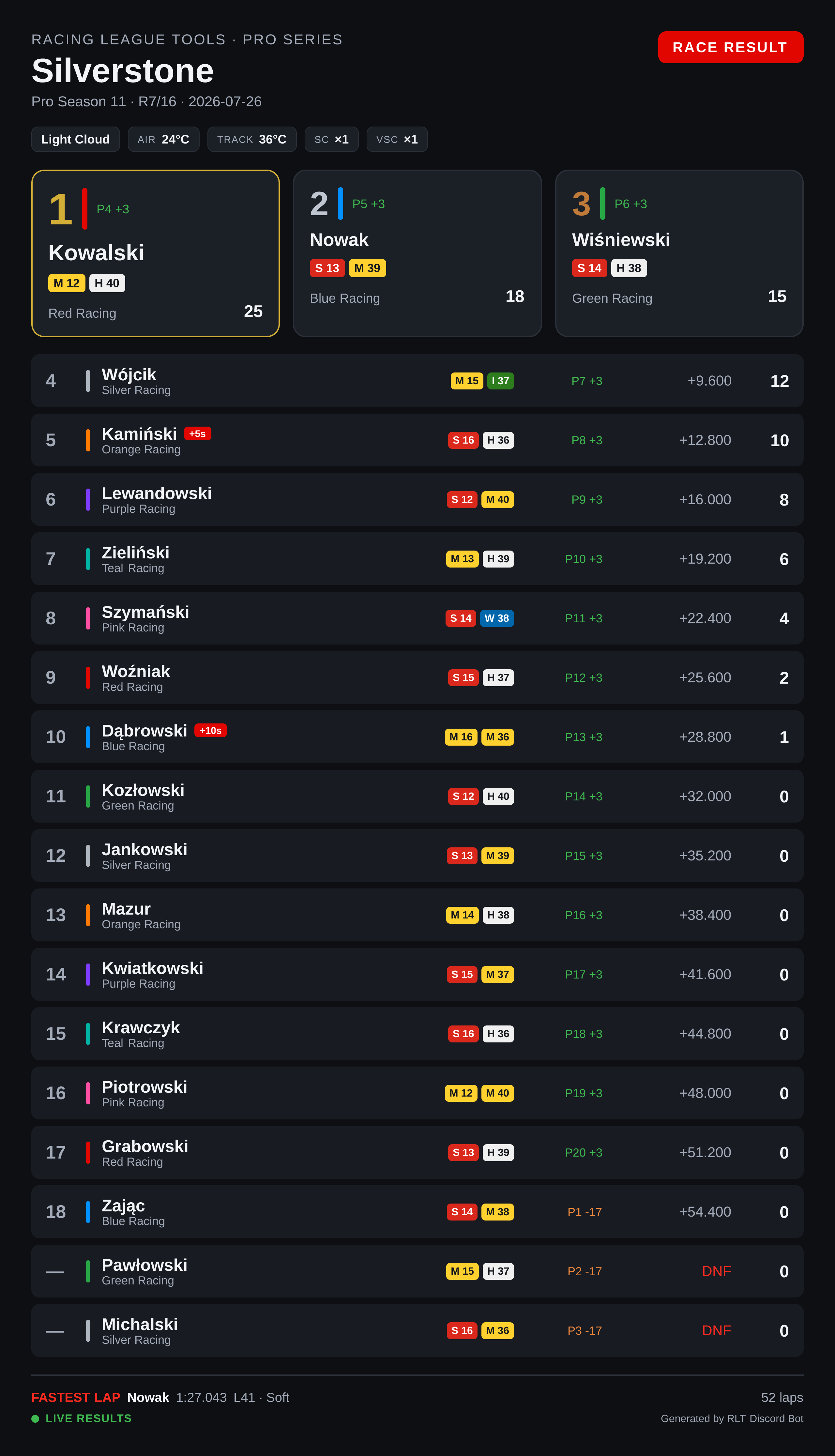
Reading the card:
- Conditions bar under the title — weather, air and track temperature, and how many times the safety car and virtual safety car were deployed.
- Podium boxes for the top three, each with the driver's team colour.
- Tyre pills — the compound of each stint and how many laps it lasted (
M 12,H 40). White is Hard, yellow Medium, red Soft, green Intermediate, blue Wet. - Grid → finish, e.g.
P4 +3— started fourth, gained three places. Green for places gained, orange for places lost. - Time or gap, then points.
- A red
+5sbadge next to a name marks a time penalty;DNFreplaces the gap for retirements. - Footer — fastest lap of the session, total laps, and a green LIVE RESULTS dot when the session came from telemetry.
The order and the position numbers follow the official classification, the one that counts after penalties — see How results are ordered.
Qualifying
/render-qual-results
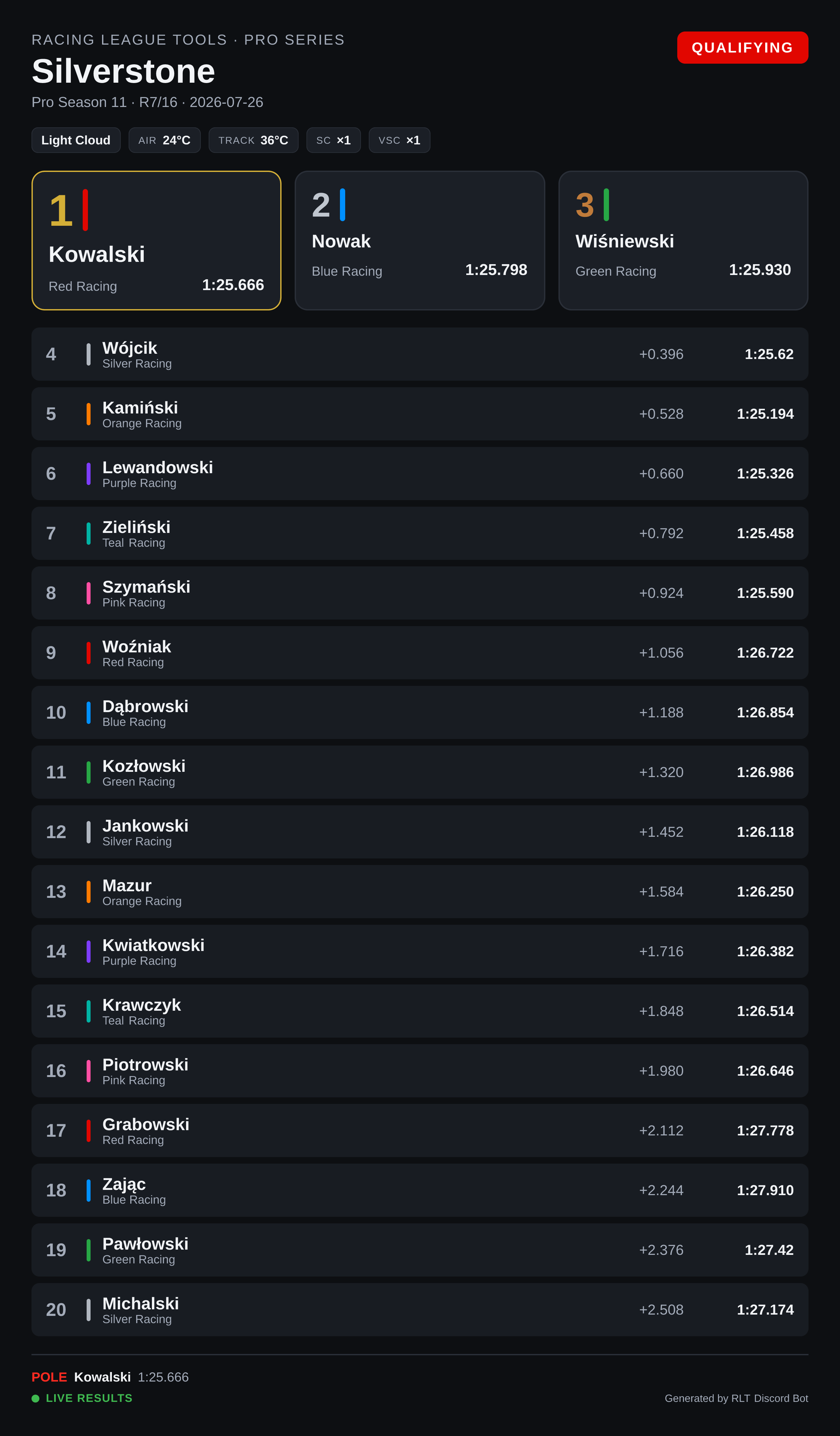
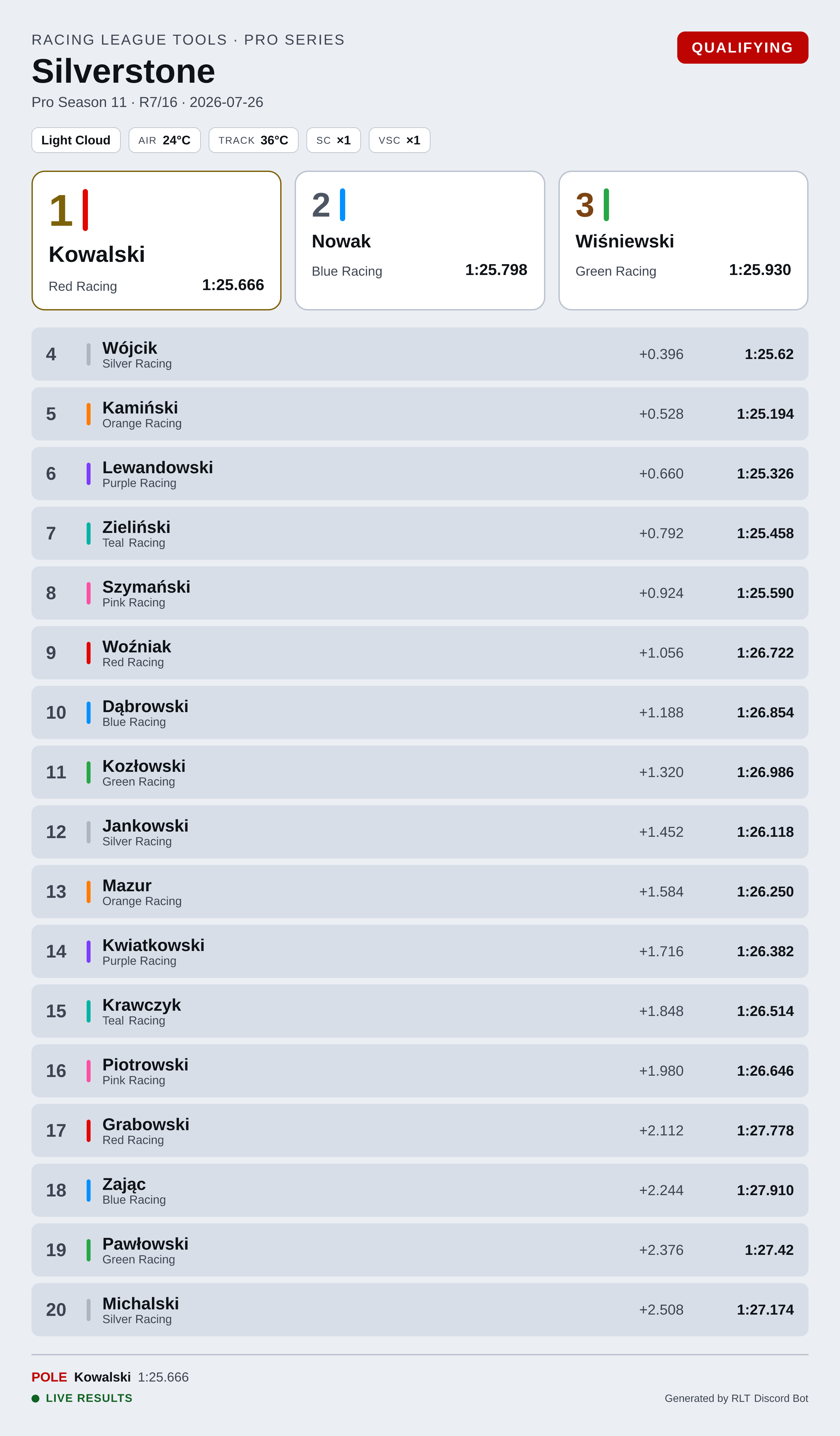
The layout matches the race card, with qualifying-specific columns: the pole box shows the pole time,
and each row carries the gap and the driver's best lap. Where the race card shows a gap to the
winner, qualifying shows INT — the interval to the driver directly ahead.
When the session was recorded from telemetry, the rows also carry the compound the best lap was set on, the number of laps completed, and top speed.
Session highlights
/render-race-highlights
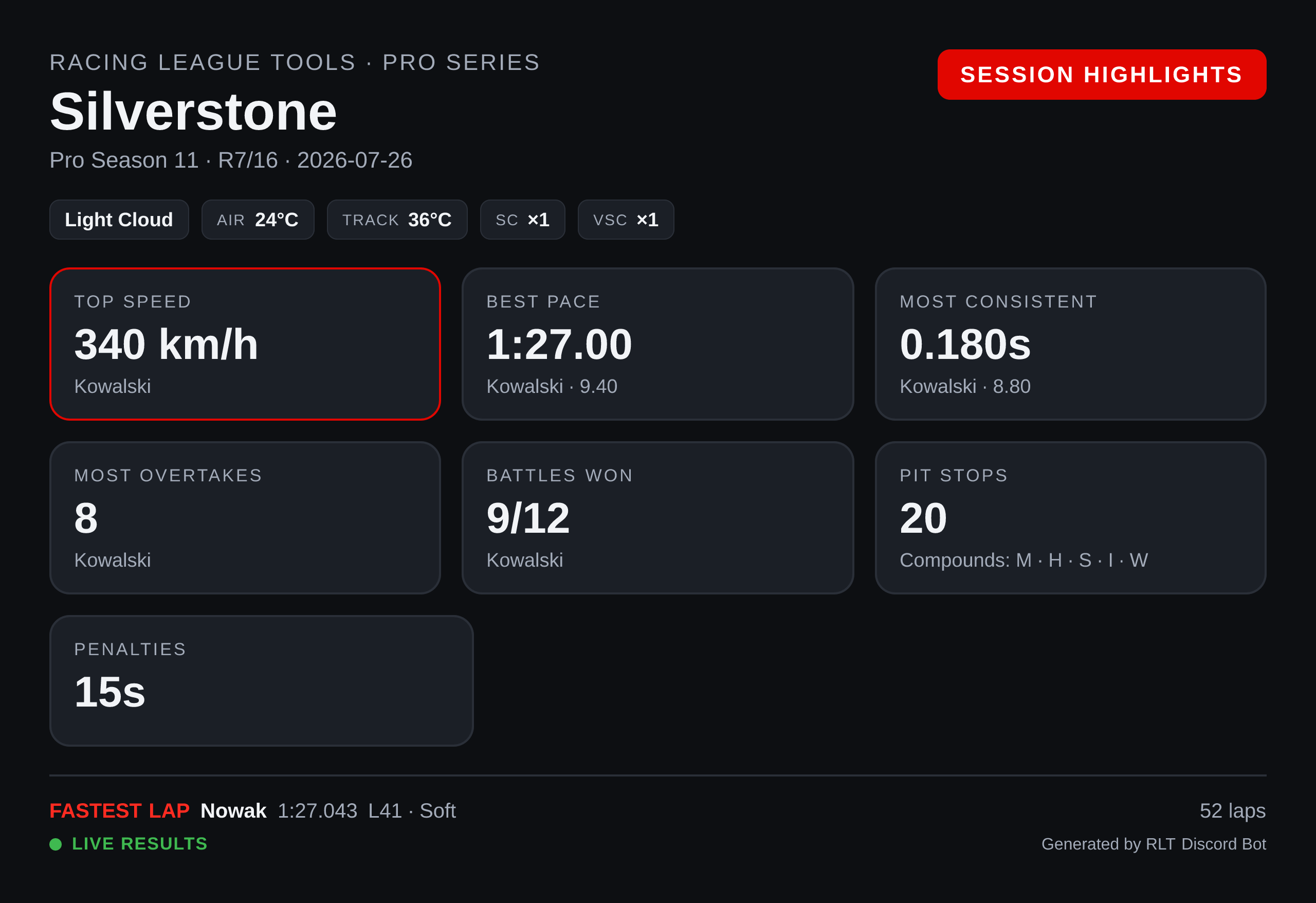
Stat tiles for the session: top speed, best pace, most consistent driver, most overtakes, battles won, pit stops with the compounds used, and total penalty time.
Needs telemetry
This card is built entirely from telemetry data. For a session whose results were entered by
hand, the command says so and points you at /render-race-results instead.
Tyre strategy
/render-race-strategy
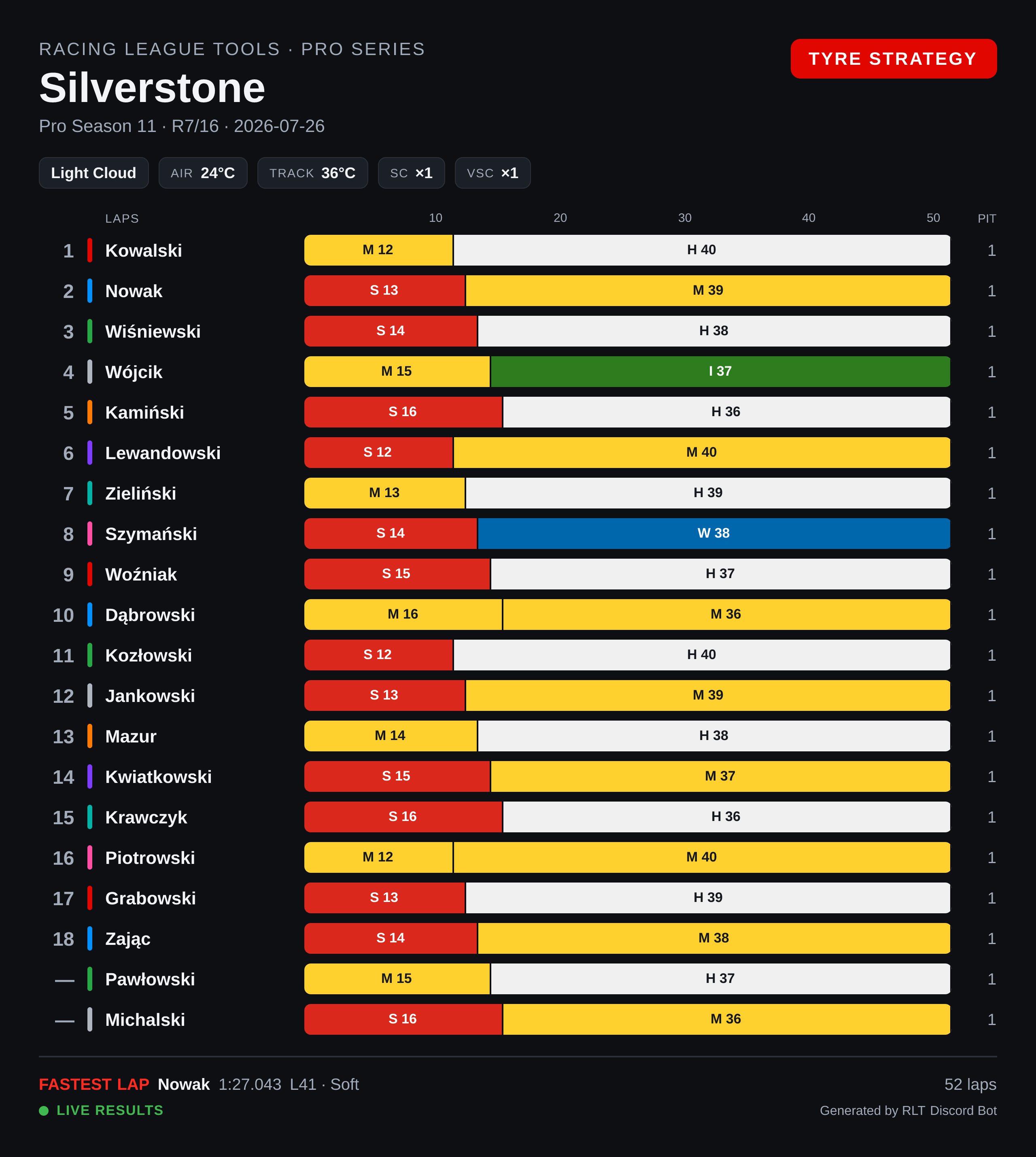
A stint chart across the full race distance: one bar per driver, split by compound with the lap count in each stint, and the number of pit stops on the right. Also needs telemetry.
Championship standings
/render-standings
/render-standings type:Constructors
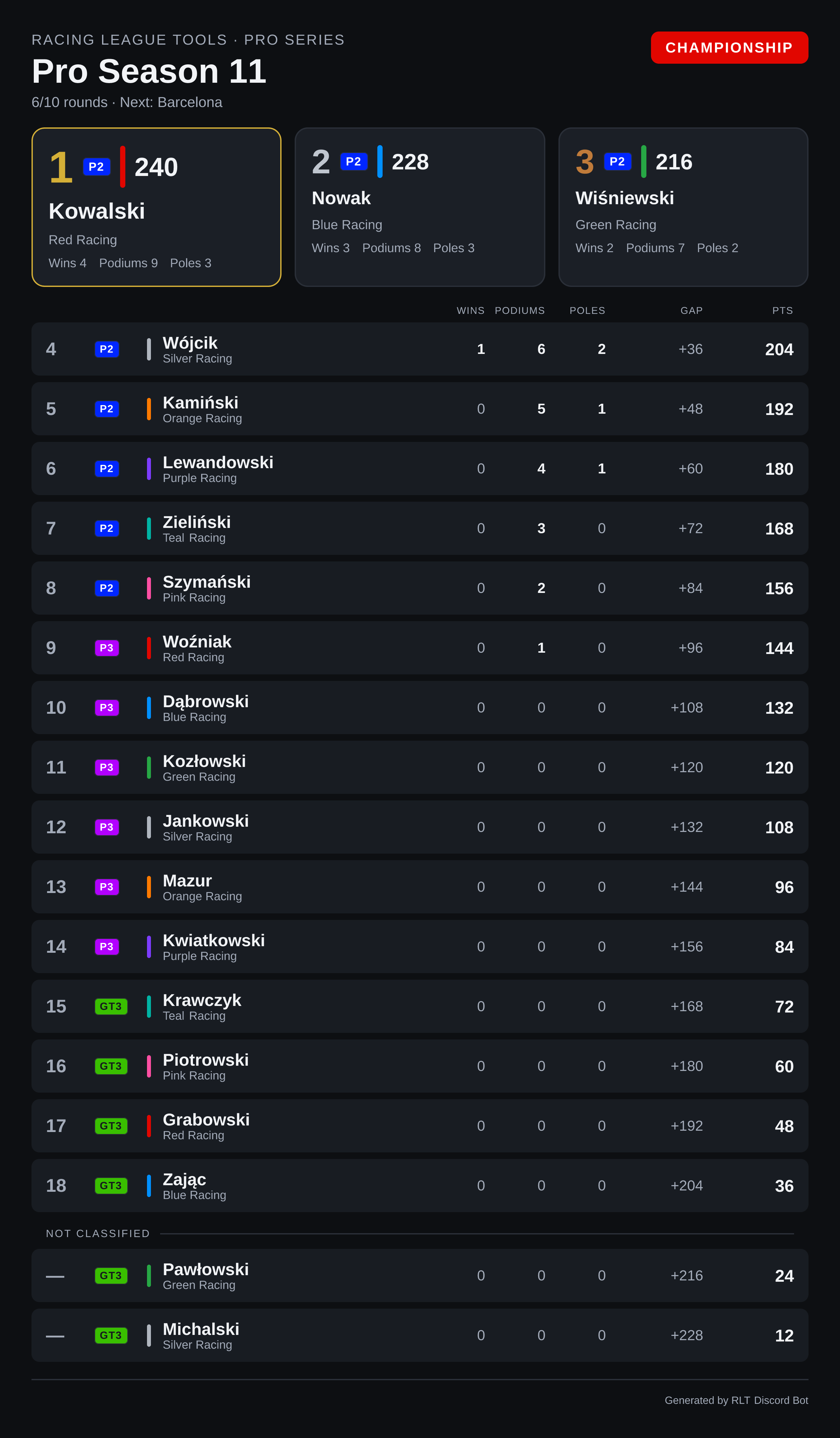
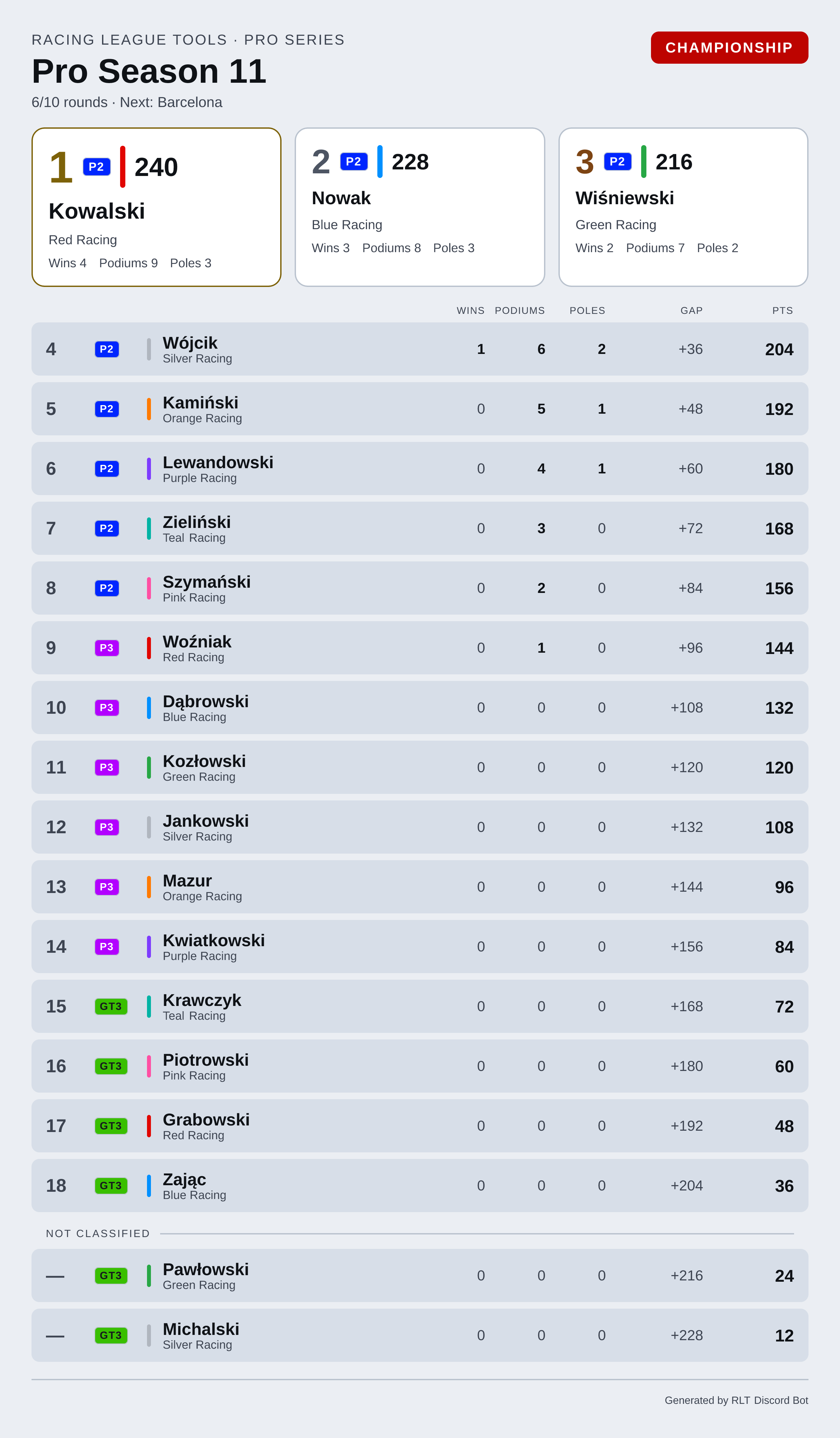
The same classification the embed lists, with room for more of it: the top three get their own boxes, and every row carries wins, podiums, poles, the gap to the leader and the points, with the driver's team colour as a stripe. The subtitle counts the championship rounds and names the next one.
| Option | Meaning |
|---|---|
season |
Season. Omitted = current. |
type |
Drivers (default) or Constructors. |
class |
One class of a multiclass season — see Multiclass seasons. |
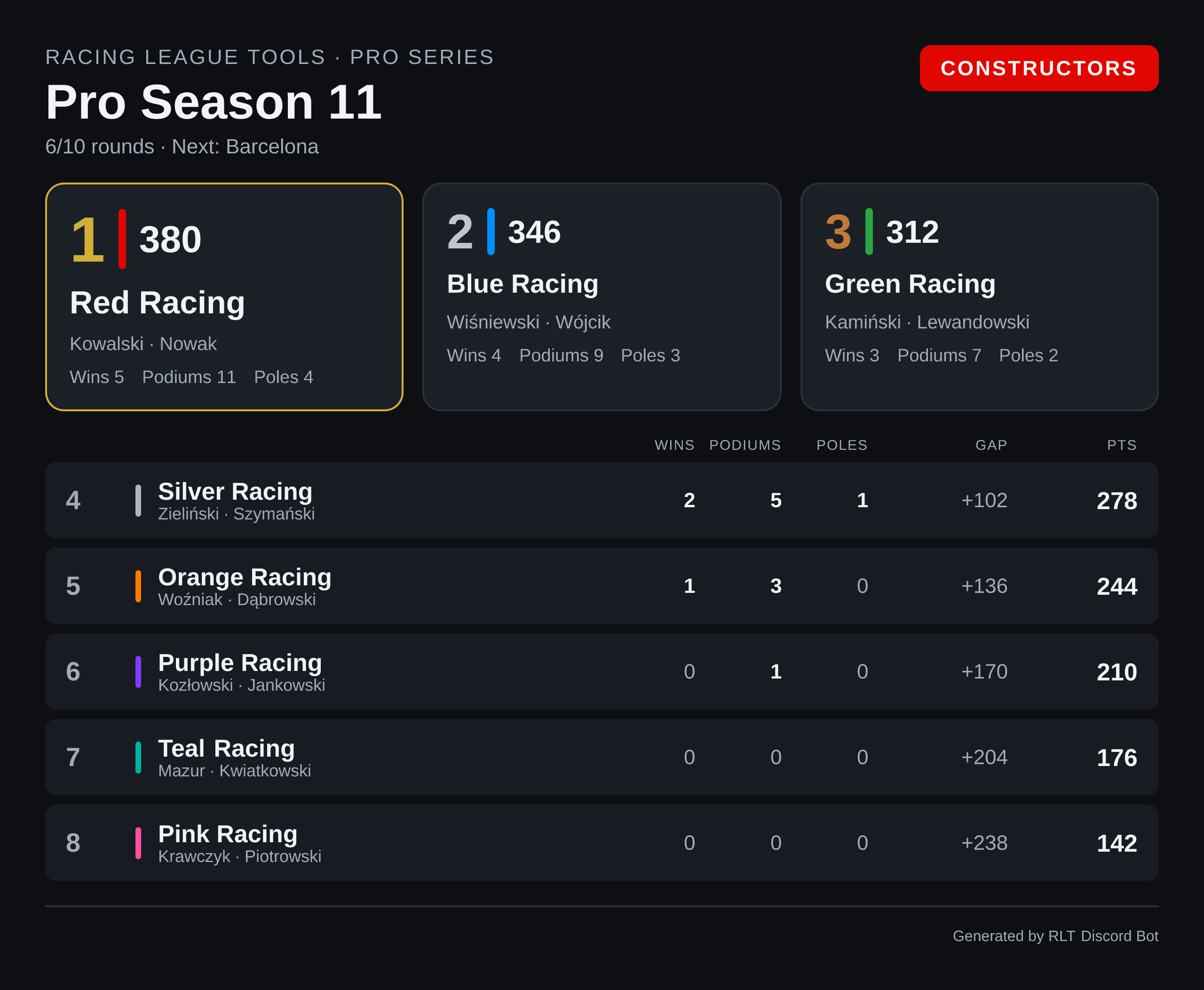
type:Constructors swaps the drivers for teams, and each row's subtitle becomes that team's drivers:
Drivers outside the classification
Racing League Tools numbers the classified entries 1..N and can leave others unnumbered — a
reserve driver who scored in a one-off, for instance. Those rows keep their points but get a —
instead of a position, under a Not classified heading at the bottom. Hiding them would eat
somebody's points; calling them "0" would read like a position.
Season lineup
/render-lineup
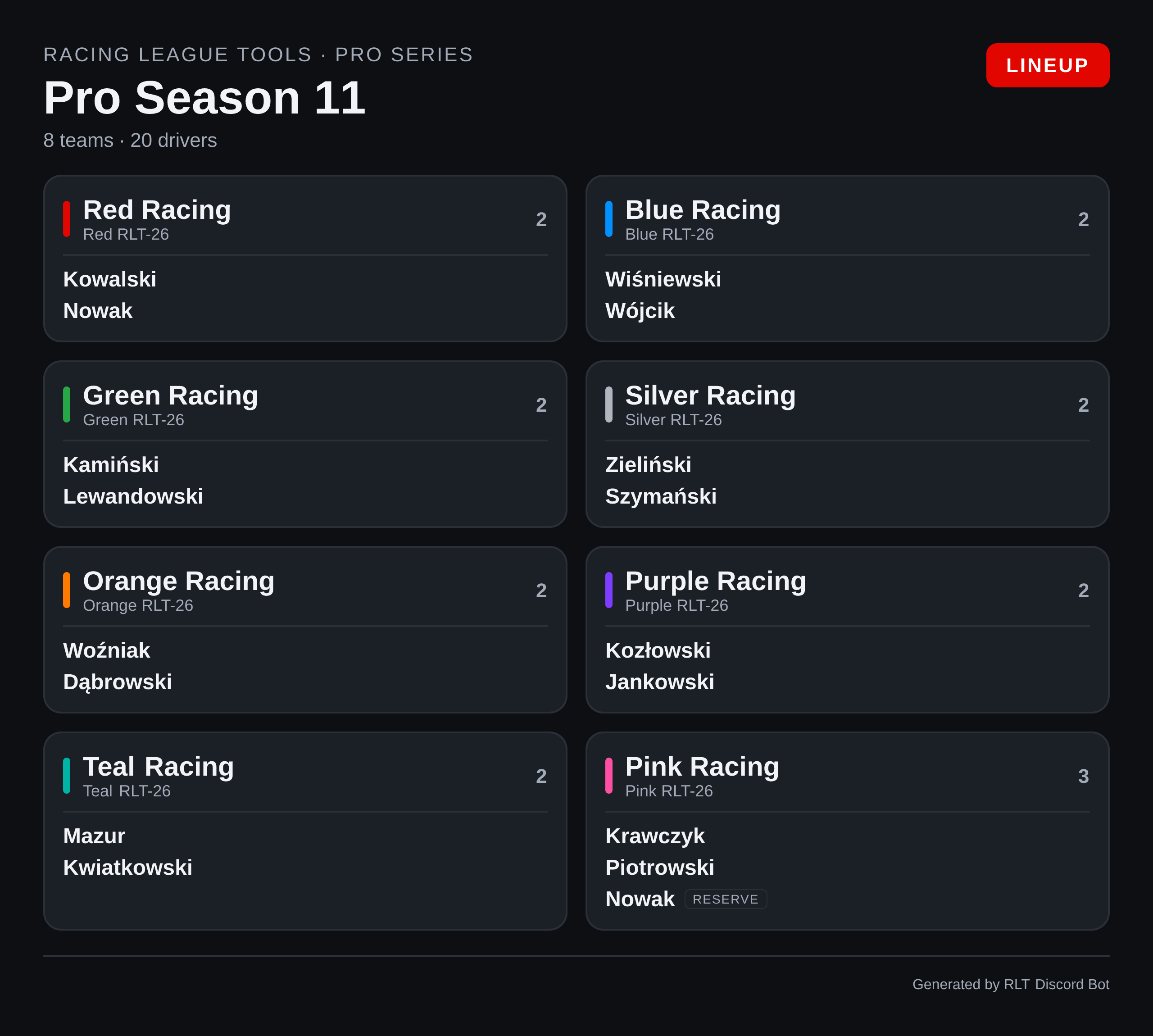
Who holds a seat this season. A driver outside the primary line-up is marked RESERVE; a seat with no team goes to a No team section at the bottom.
| Option | Meaning |
|---|---|
season |
Season. Omitted = current. |
Seats, not everyone who raced
The card lists the season's filled seats. A driver who scored points without holding a seat —
a one-off stand-in, for example — is not in the lineup and is not drawn here. Their points are in
/standings, which is the question they answer.
There are no points on this card on purpose. It answers who drives with whom; the classification is one command away and says the rest.
The layout follows what your league actually has. A team-based league (F1-style) gets the team tiles above. In an endurance league the entry is a car, not a team, and Racing League Tools publishes no team for those seats — so the card becomes a table of car → its drivers, grouped by class:
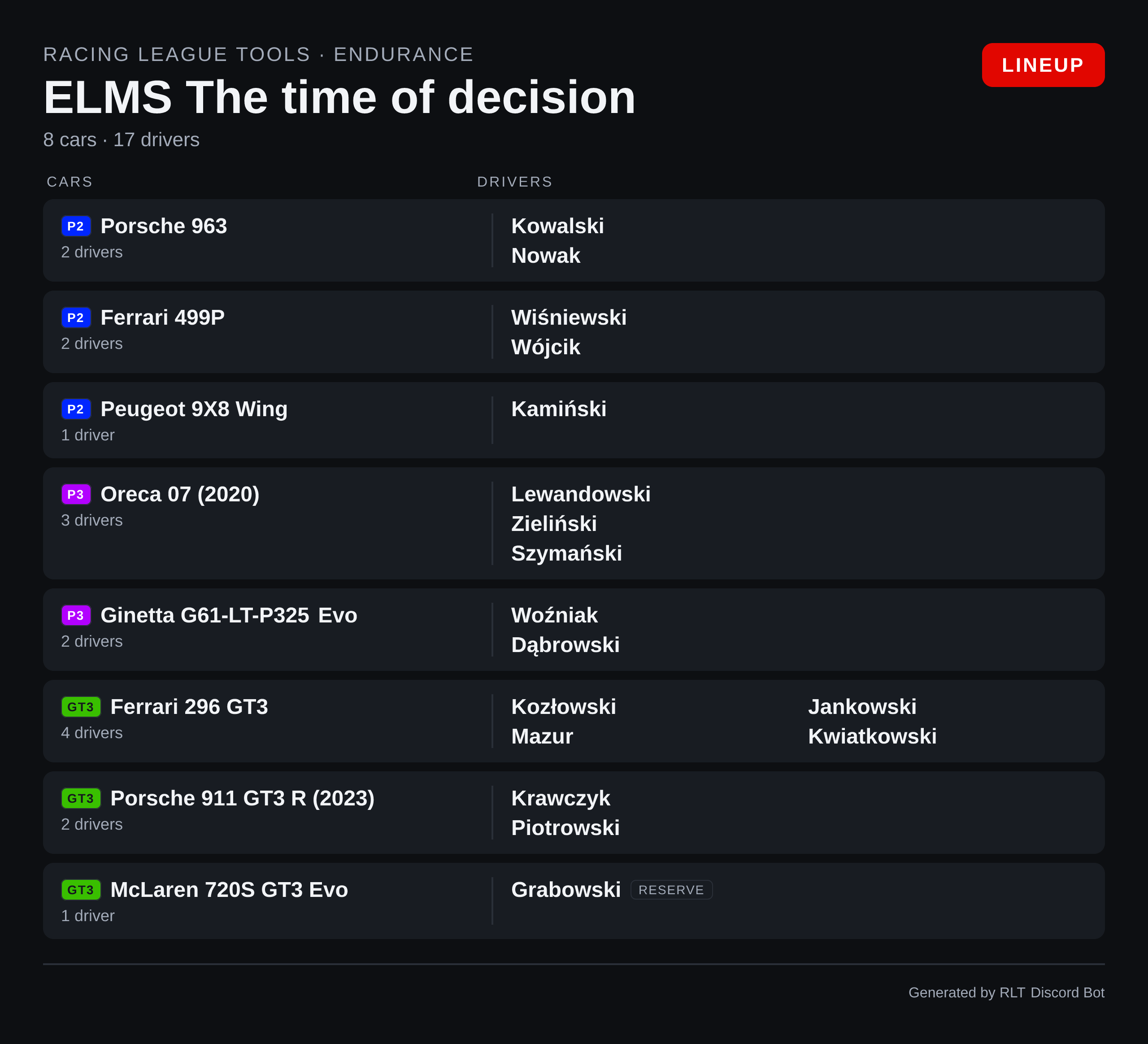
Two entries of the same car model share a row
Racing League Tools identifies the model of a car, not the individual entry, so three separate crews running the same GT3 car appear as one row with all their drivers. There is no entry identifier in the data to split them by.
Note
A season whose seats are not filled in yet has no lineup to draw, and the command says so rather than drawing a grid of empty tiles.
Season calendar
/render-calendar
/render-calendar view:Upcoming
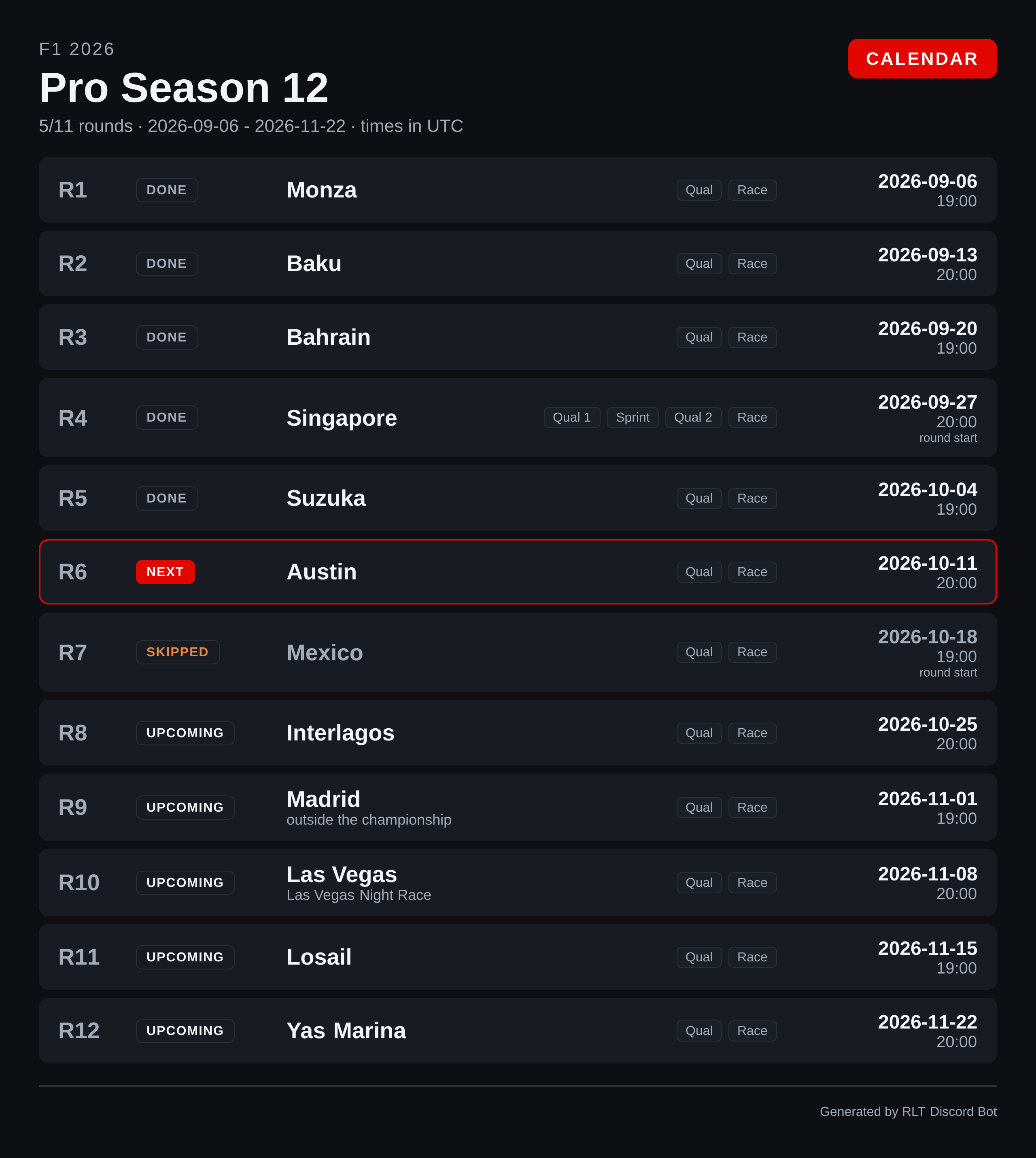
Every round with its status, track, sessions and date.
| Option | Meaning |
|---|---|
season |
Season. Omitted = current. |
view |
Full calendar (default) or Upcoming. |
Reading the card:
- DONE / NEXT / SKIPPED / UPCOMING — the round's status as a word. The next unraced round is also outlined in the accent colour; a skipped round is dimmed, because it is the one status that means this will not happen.
- Session pills — the sessions of that round, in order. A sprint weekend shows
Qual 1 · Sprint ·
  Qual 2 · Race
, numbered exactly as thesessionautocomplete numbers them. - Date and time, with
round startunder the time when Racing League Tools only publishes when the round begins rather than the race itself. - outside the championship under a round that is on the calendar but scores no championship points.
One zone for everyone
A PNG cannot adapt to each reader's time zone the way Discord's live timestamps can, so the card
states one zone in its header and sticks to it. That zone is your
league time zone; without the setting it is UTC, which is how
Racing League Tools sends the data. For times in everyone's own zone plus a countdown, use the
embed: /season view:Upcoming.
Track history
/render-track track:Monza
/render-track track:Monza multiseason:Pro Overall
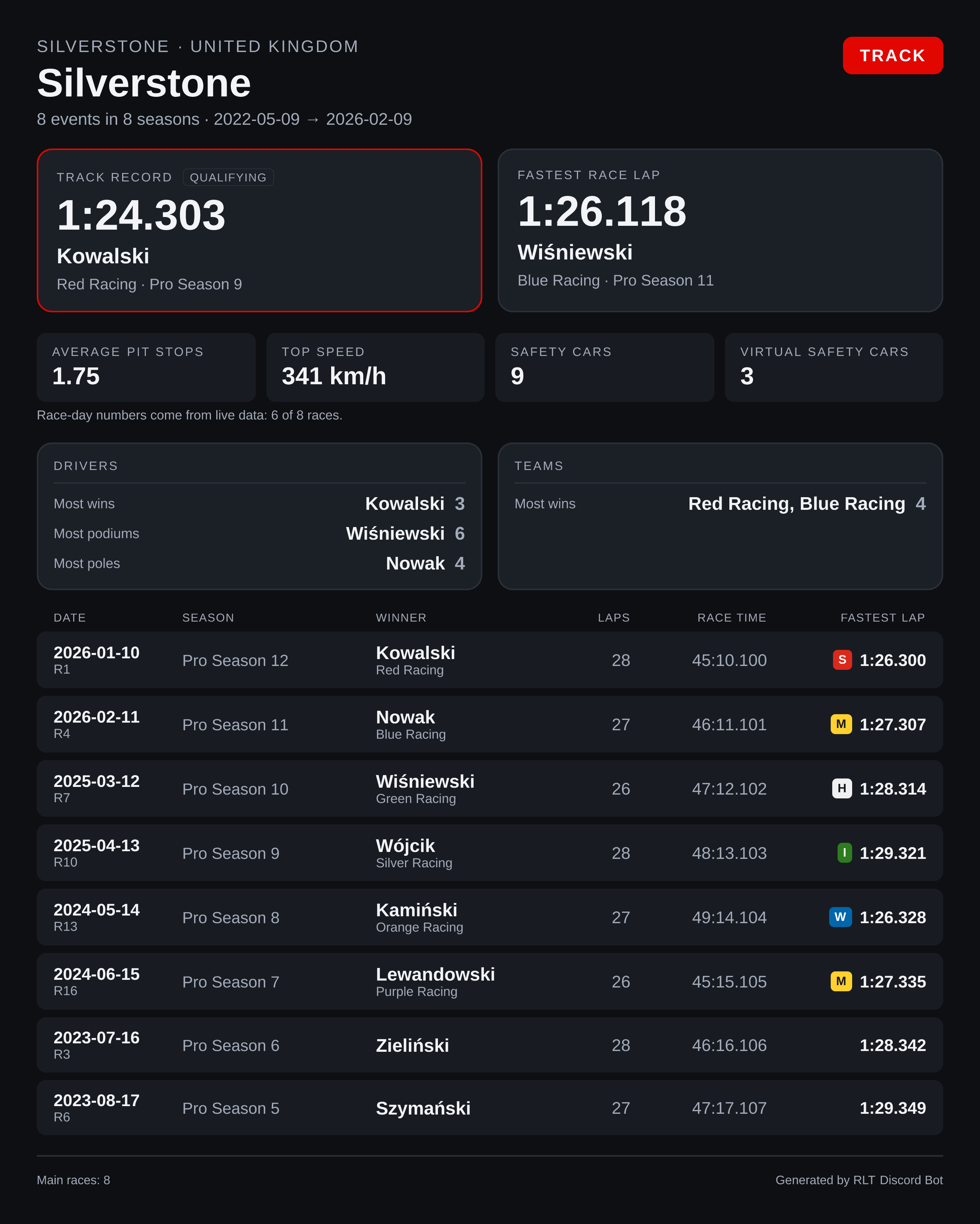
Everything your league has done at one circuit, on a single card.
| Option | Meaning |
|---|---|
track |
Circuit. Required — pick it from the suggestions. |
multiseason |
Narrow the whole card to a group of seasons. Omitted = all of them. |
Reading the card:
- Track record — the fastest lap ever set there, outlined in the accent colour. It is often a qualifying lap, and the card says so, because a qualifying time reads very differently from a race time. When the fastest race lap is a different time, it gets its own tile next to it.
- Race day — average pit stops, top speed, safety cars and virtual safety cars, with a line underneath saying how many races those numbers cover.
- Drivers / Teams — who has the most wins, podiums and poles there.
- The table — every main race at that circuit: date, round, season, winner and their team, laps, race time and the fastest lap with its tyre compound.
Circuits with two layouts
A circuit that your league has raced in more than one layout appears more than once in the suggestions, with the years it was used — they are different tracks with different records, so they are counted separately.
Race-day numbers need live telemetry
Pit stops, top speed, safety cars and tyre compounds come from sessions recorded with live timing. Races entered by hand contribute positions and times but none of those, which is why the card states live data: 8 of 11 races rather than implying it measured them all. A value Racing League Tools does not have is left out rather than drawn as a zero.
Sprints are counted but not listed
The table lists main races. A sprint counts towards the totals at the top but does not get its own row, so the race count in the footer can be lower than the number of races held.
Team career
/render-team multiseason:Pro Overall team:McLaren
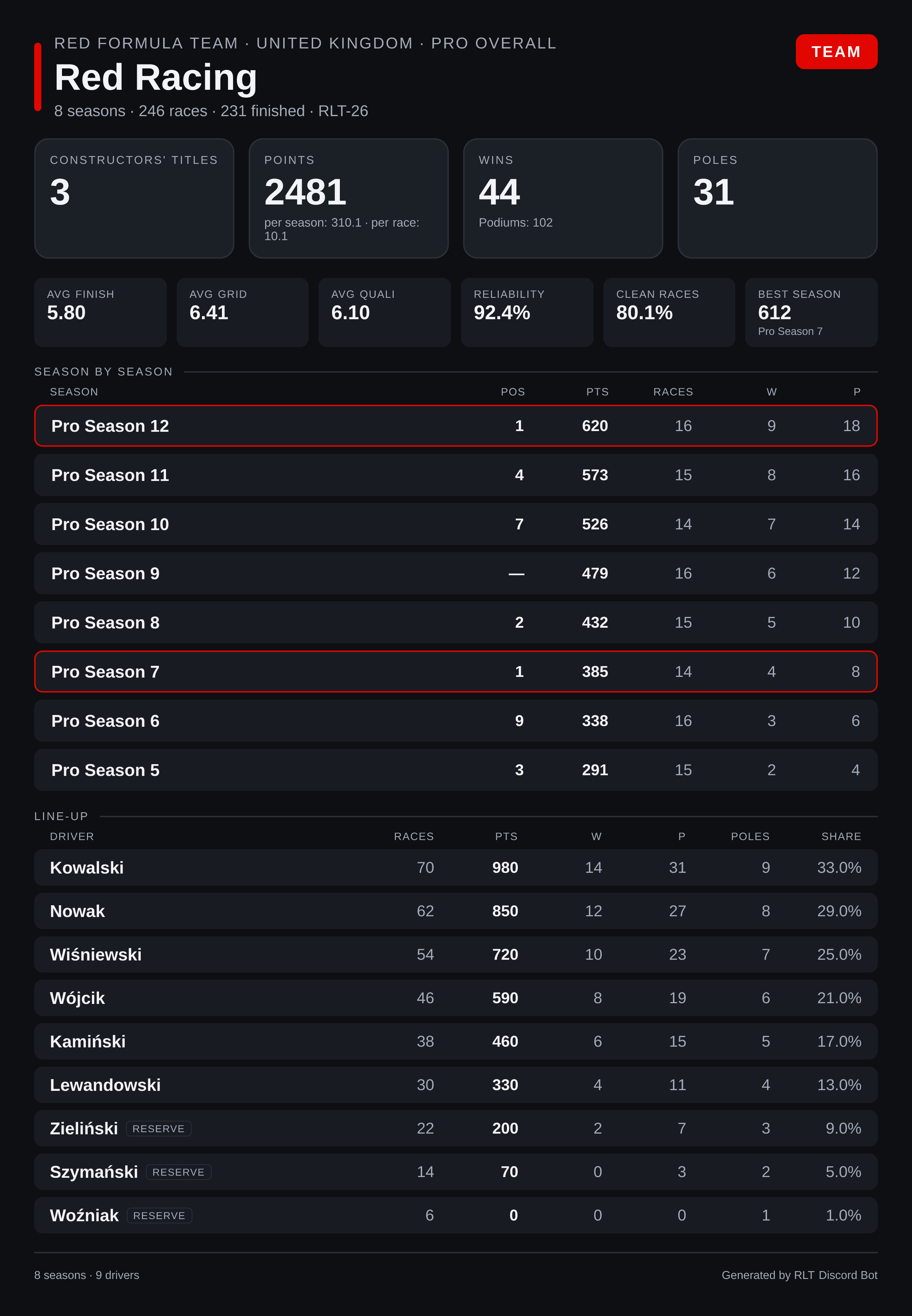
One team's whole history inside a group of seasons.
| Option | Meaning |
|---|---|
multiseason |
Group of seasons. Required. |
team |
Team. Required — pick it from the suggestions. |
Reading the card:
- Four headline numbers — constructors' titles, total points with its averages, wins with podiums, and poles.
- The strip below — average finish and grid, average qualifying, reliability, clean races and the best season.
- Season by season — every season with position, points, races, wins and podiums. A season the team won is outlined in the accent colour.
- Line-up — every driver who raced for the team, ordered by their share of the team's points, with reserves marked.
Switch team statistics on first
Racing League Tools computes this per multiseason and only when the league enables team statistics for that multiseason in RLT Desktop. Until then the command says so and names what to switch on. All Seasons never has them — it is not a real multiseason.
A renamed team keeps one history
Teams arrive merged across seasons under their current name, so a team that changed names mid- history is one card rather than two.
Multiclass seasons
In a season with racing classes, every driver row on a card carries a class badge in the class's own colour, and the class column takes its width from the name column so the table stays the same width on a phone:
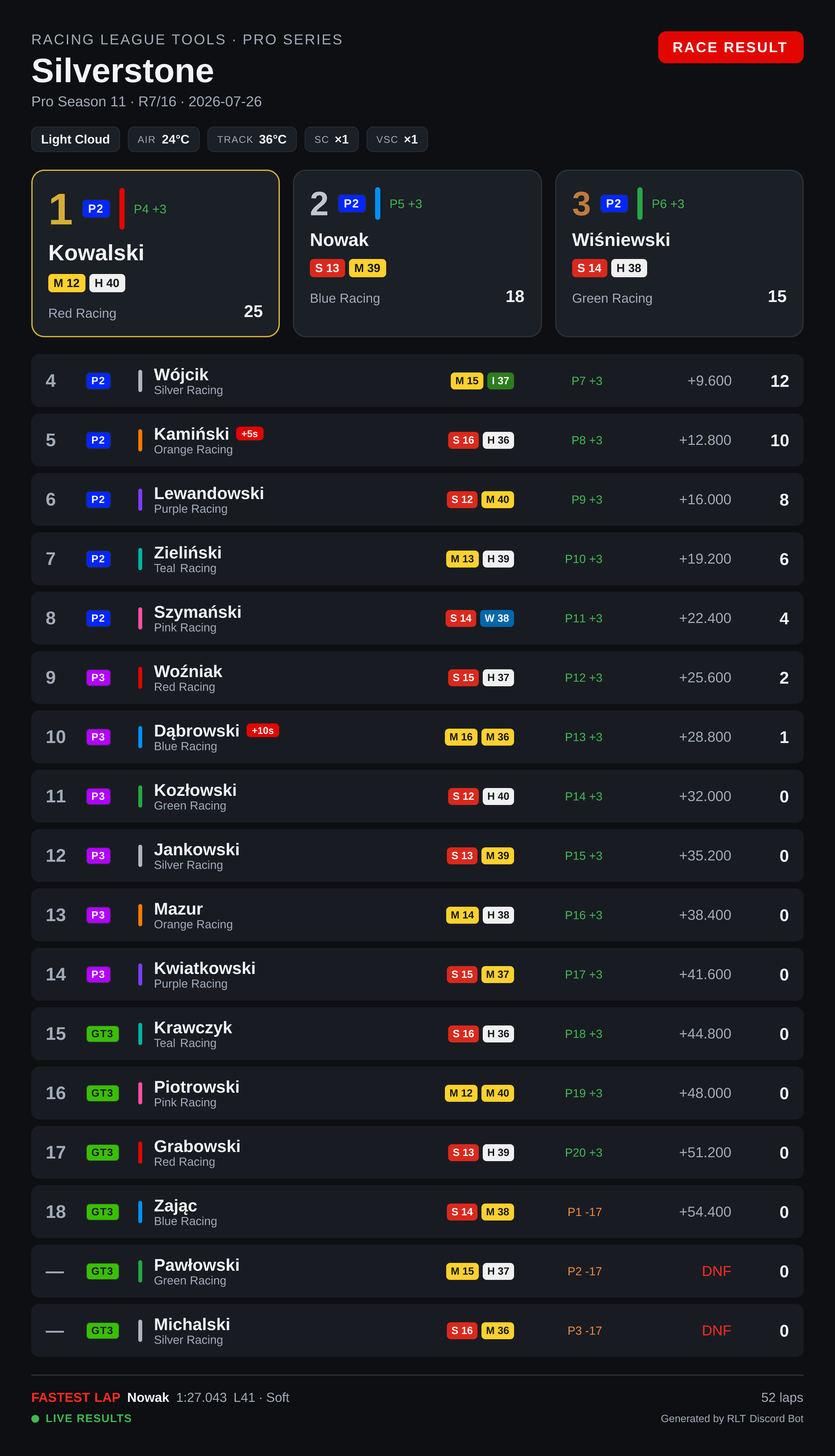
Nothing needs switching on. The badges appear when Racing League Tools reports classes for the session or season, and a single-class season renders exactly as it did before.
The class option
Three cards can narrow to one class: /render-race-results, /render-qual-results and
/render-standings. Pick the class from the autocomplete list.
/render-race-results class:LMP3
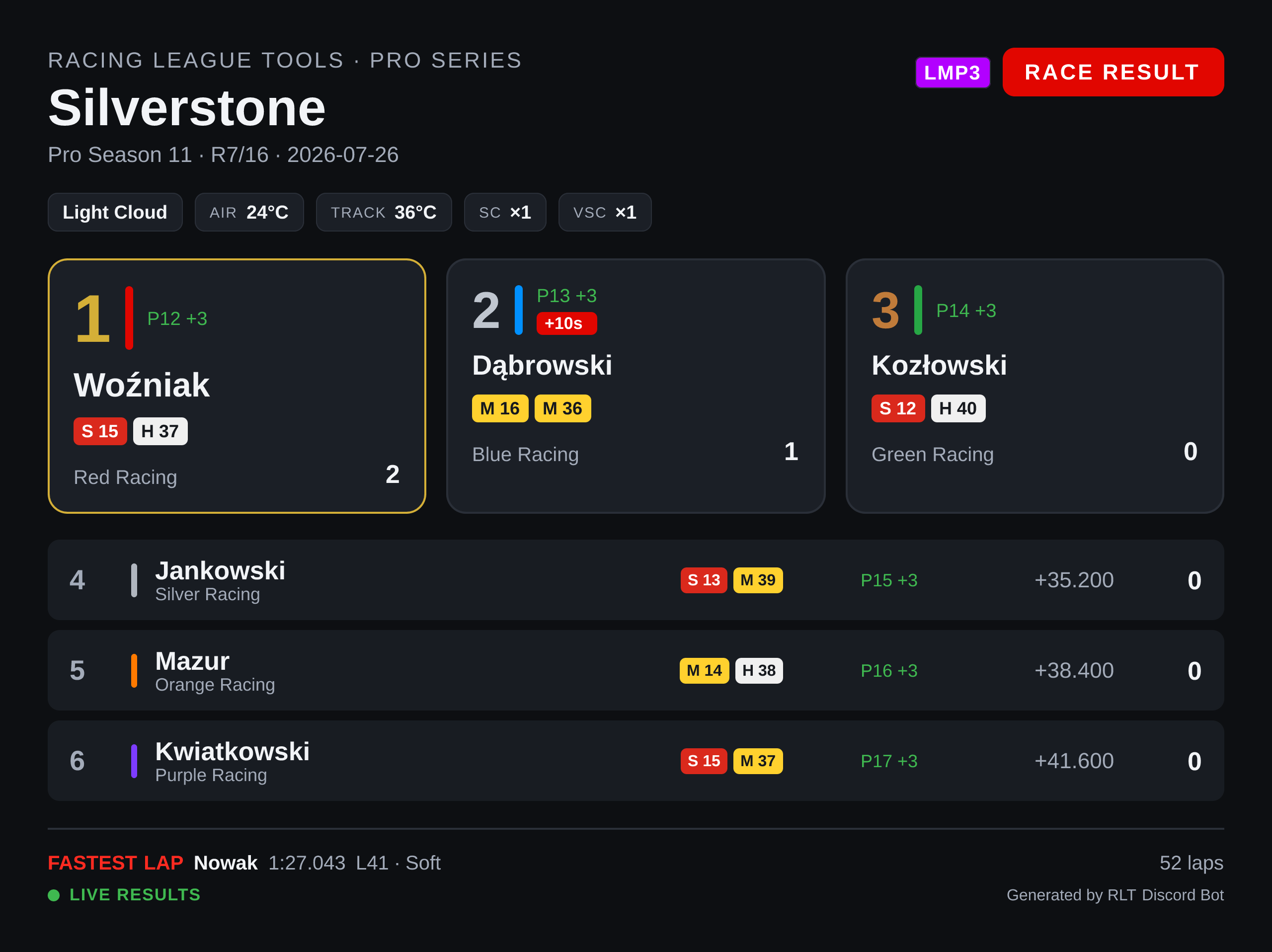
The card is then the classification of that class: positions are class positions, the fastest lap
is the class's fastest lap, and the class is named once as a pill in the header instead of being
repeated on every row. In a race, a driver a lap or more down shows +1 Lap rather than a time.
Two cards deliberately have no class option: /render-race-highlights and
/render-race-strategy compare the whole session — the tiles and the stint chart would change
meaning, not just lose rows.
What Racing League Tools doesn't publish per class
class with type:Constructors says so instead of drawing an empty table: constructor standings
exist per season, not per class. Text embeds (/standings, /race-results, /qual-results)
show the class badges too, but have no class option — their tables are the overall
classification, so the results top 10 can be ten drivers from the fastest class.
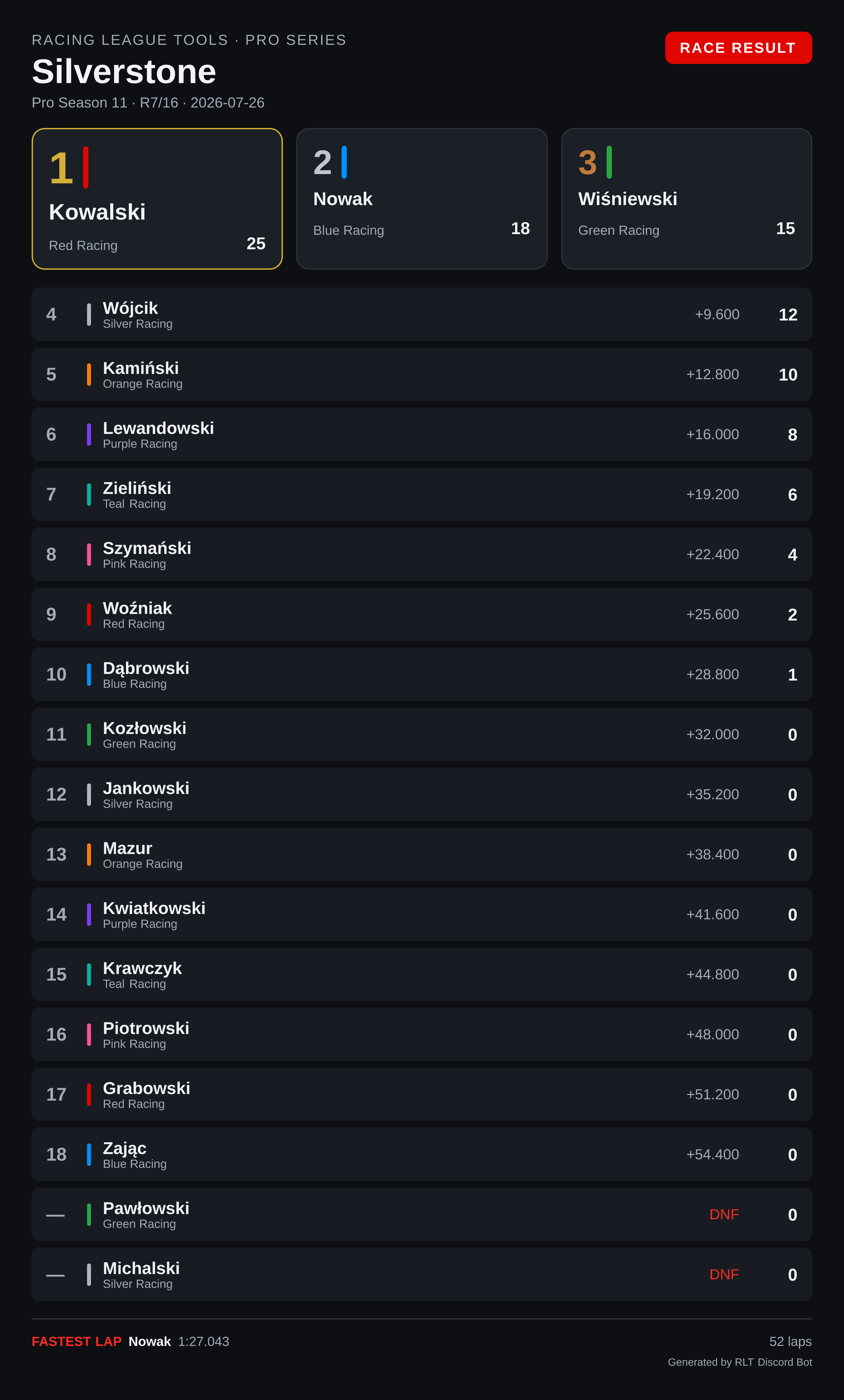
Live sessions versus manually entered results
How much a session card can show depends on where the results came from, and that is decided per session — a single season can contain both kinds. The season cards (standings, lineup, calendar) and the team card don't depend on telemetry at all; the track card is a mix, since it sums up sessions of both kinds.
| Recorded live (UDP telemetry) | Entered manually | |
|---|---|---|
| Positions, times, gaps, points, best lap | yes | yes |
| Conditions bar (weather, temperatures, SC/VSC) | yes | — |
| Tyre pills and stints | yes | — |
| Grid → finish | yes | — |
| LIVE RESULTS marker | yes | — |
/render-race-highlights, /render-race-strategy |
yes | not available |
| Race-day numbers on the track card | yes | — |
The same race, entered by hand — same classification, none of the telemetry extras:
Tip
Recording sessions with live timing is what unlocks the highlights and strategy cards. See Live Timing for how to set it up.